 Snapchat has changed the way we share photos and videos by making filters and augmented reality (AR) effects popular worldwide. Because of this, many people now enjoy adding fun masks, face swaps, and creative effects to their selfies. However, not everyone wants to use Snapchat, and some users are looking for alternatives that offer similar or even better filters. Fortunately, there are many apps today that let you enhance your photos and videos in exciting ways. In this article, we will explore the best filter apps like Snapchat. You will discover options that are easy to use, fun, and packed with features to make your photos more engaging and unique.
Why Some Users Prefer Snapchat Alternatives?
Many users look for alternatives to Snapchat for several reasons. Here are some of the reasons why Snapchat alternatives may be a better choice.
- Too many ads or paid features: Snapchat shows a lot of ads, and some useful features are locked behind a paid plan. This can feel annoying or limiting, especially if you just want to enjoy the app freely.
- Privacy and data concerns: Some users worry about how their data is collected or used. As a result, they might prefer apps with clearer privacy policies or a stronger commitment to protecting user data.
- More editing tools and effects: While Snapchat has popular filters, other apps may offer more creative tools, better effects, and advanced photo and video editing options.
- Different design or social experience: Not every user likes Snapchat’s layout or style. Some users prefer a cleaner design, simpler navigation, or a different way to connect with friends.
- Unique styles and niche features: Some apps similar to Snapchat filters often focus on specific looks or features. These apps are made for artistic edits, others for private sharing, or for certain communities. This provides users with more ways to match their unique style and preferences.

Best Filter App for Selfies Like Snapchat
| App | Best For | Pricing Plan | Platform |
|---|---|---|---|
| TikTok | Short videos with fun AR & trending filters | Free (in-app purchases possible) | iOS, Android, Web |
| Social sharing & face filters | Free | iOS, Android, Web | |
| FaceApp | Realistic facial transformations | FaceApp Pro $10/month, Free (limited filters) | Android, iOS |
| YouCam Perfect | Beauty edits & filters | Premium $5.99/month, Free (limited effects) | Android, iOS |
| Snow | Cute & seasonal filters | Snow VIP $6.99/month, Free | iOS, Android |
| Banuba | AR face filters & fun masks | Individual App $19.99 to $24.99/month, Free trial | Android, iOS |
| Sweet Face Camera | Fun stickers & live camera effects | $4.99 to $9.99/month, Freemium option |
iOS |
| B612 | Beauty & creative filters | B612 VIP $3.99 - $9.99, Freemium | Android, iOS |
1. TikTok
Standout Feature: It has a "Create" mode, which makes it easy to use templates, filters, and effects for video creation.
TikTok is one of the top filter apps like Snapchat, and it stands out for combining creativity with ease of use. As we tried the app, we discovered it offers an extensive library of augmented reality filters and effects. These include beautification filters and humorous distortions. This makes the application a highly compelling platform for users to produce and share short-form video content. Unlike Snapchat, TikTok provides intuitive editing tools that let users add music and text effortlessly. It also constantly updates the app with new filters and effects to ensure trends remain fresh and engaging. Furthermore, TikTok's powerful recommendations algorithm introduces users to a diverse range of content.
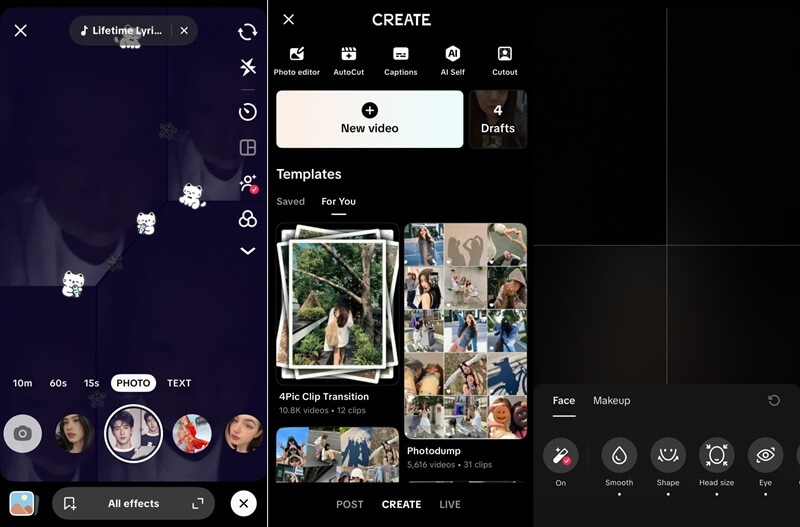
- It uses AI-based facial recognition to accurately track facial movements, enabling you to seamlessly apply dynamic filters that respond to your expression.
- This app with Snapchat-like filters is also available on iOS and Android, letting you access creative tools on any device.
- Some effects require an account to save or share, limiting access for new users.
2. Instagram
Standout Feature: This filter app like Snapchat lets you organize Stories and favorite posts for easy access later.
Another prominent platform that offers a robust suite of user-generated filters and AR effects is Instagram. With this tool, you can apply fun masks and beauty filters to your photos and videos. It also lets you add interactive animations to create eye-catching Stories and Reels. In addition, as we tried applying these filters and effects, we found out that you can also insert emojis, stickers, and GIFs. With these features, you can effortlessly enhance your visual content and engage with your audience. Compared with Snapchat, Instagram offers a more public, curated platform for sharing, often emphasizing aesthetic appeal and broader reach.
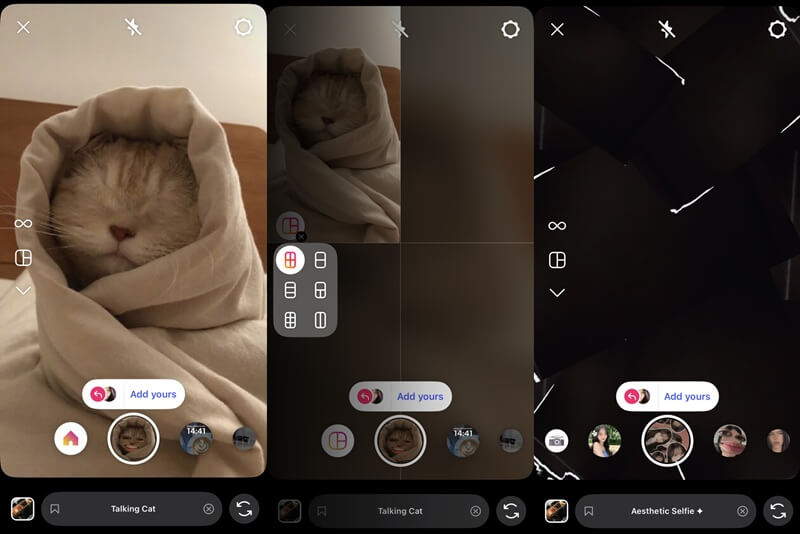
- It seamlessly integrates with other Meta platforms, such as Facebook and Messenger, enabling cross-posting and expanded audience engagement.
- This app also lets you create collages with effects to express your creativity through unique visual arrangements.
- While it shows fewer ads than Snapchat, the growing number of ads and sponsored content can diminish the platform's organic feel.
3. FaceApp
Standout Feature: FaceApp excels at transforming facial features with impressive realism, giving you a more visually striking appearance.
Next on the list of apps with filters like Snapchat is FaceApp. After trying it, we found it focuses more on beauty and facial enhancements than on playful AR effects. The app enables you to easily transform your selfies or videos by smoothing skin, adjusting facial features, and experimenting with hairstyles or makeup. Additionally, FaceApp's AI-powered filters respond naturally to facial expressions, making edits look realistic. Compared to Snapchat, it leans more toward polished, attractive images than fun or silly effects. This is anyone who wants to enhance their photos quickly while still having creative control over their look.
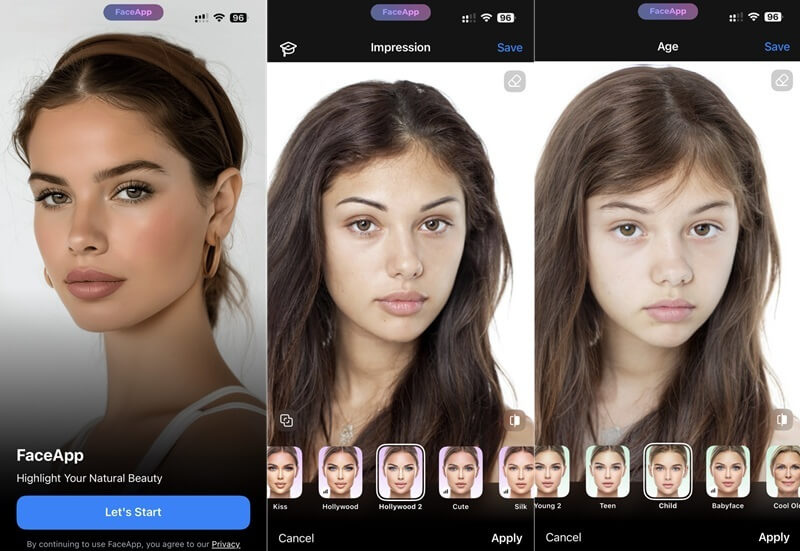
- It also provides diverse, high-quality filters that offer realistic transformations, including age progression, gender swaps, and various hairstyles.
- Every photo you select for editing will be uploaded to the cloud and processed there, ensuring consistent results across devices.
- Many advanced editing features are locked behind a paid subscription, which limits the free version’s capabilities.
4. YouCam Perfect
Standout Feature: It offers a photo enhancer and repair to restore old or damaged photos, making it a versatile tool for both modern image editing and photo restoration.
When we tested YouCam Perfect, it stood out among filter apps like Snapchat for its beauty-focused feature. At first glance, the app offers multiple functions primarily designed to enhance selfies and portraits. Moreover, it goes beyond basic filters by offering smart tools that improve photos with just a few taps. During testing, the AI tools stood out by improving images smoothly and removing stickers from photos. Unlike Snapchat, this app has a body-shaping feature that lets you slim your waist, lengthen your legs, and refine your proportions realistically. This means you can achieve your preferred aesthetic without extensive manual editing, making it a great alternative to Snapchat filters.
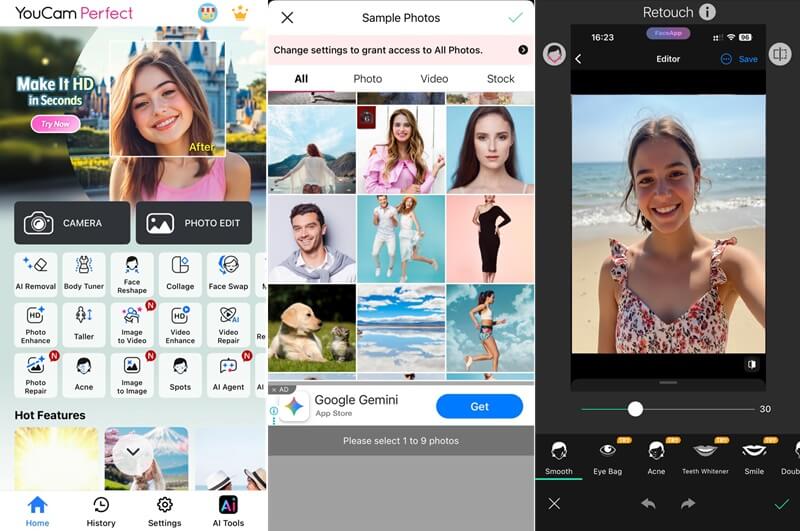
- It also allows you to refine your selfie with face reshape to adjust your jawline, smooth out blemishes, and refine your eyes and nose.
- This application also has virtual makeup filters that let you try on different cosmetic looks to experiment with various styles before applying them in real life.
- Like FaceApp, some of its features are locked with a subscription, so you cannot use all of its tools unless you pay.
5. Snow
Standout Feature: Its real-time beauty filters and cute AR effects let you instantly smooth your skin and playful overlay.
As an alternative to Snapchat, Snow offers a diverse array of stickers and masks for a global audience. This popular Japanese and Korean filter app is known for its extensive collection of aesthetic and beautifying filters that enhance selfies and videos. Aside from stickers and masks, users can also apply multiple effects categorized by themes such as Fun, Seasonal, Cute, Beauty, and more. Compared to Snapchat, it emphasizes subtle, natural-looking enhancements. Additionally, it presents a wide range of layouts and aspect ratios for your photos. The application also features advanced editing tools for fine-tuning details such as skin tone, facial features, and makeup.
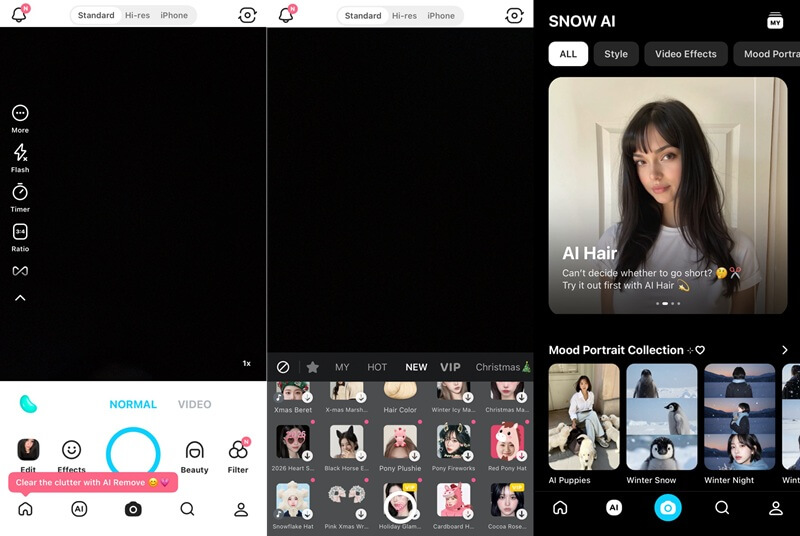
- This app similar to Snapchat with filters, also offers multiple AI tools like AI remove, AI expand, and more, giving you more options to create your images with precision.
- It also provides a video feature with a diverse range of templates and editing tools that can transform raw footage into a polished one.
- The app can be resource-intensive, potentially slowing down older devices or consuming significant battery life during extended use.
6. Banuba
Standout Feature: It offers a powerful SDK for developers, enabling the integration of its advanced AR facial filters and effects into custom applications.
Another option to enhance your digital interactions is Banuba. As we tried the mobile version of the tool, like Snow, we observed that it prioritizes real-time augmented reality effects. Unlike Snapchat’s primarily social-oriented filters, Banuba’s technology is often used in professional applications. For example, its SDK lets developers add AR features to different apps, such as virtual try-ons for clothes or accessories. It also offers many beauty filters that improve facial features and apply digital makeup in a natural way. In addition, it supports real-time background changes, so users can easily alter their surroundings. This tool is also well known for its strong, accurate face recognition technology
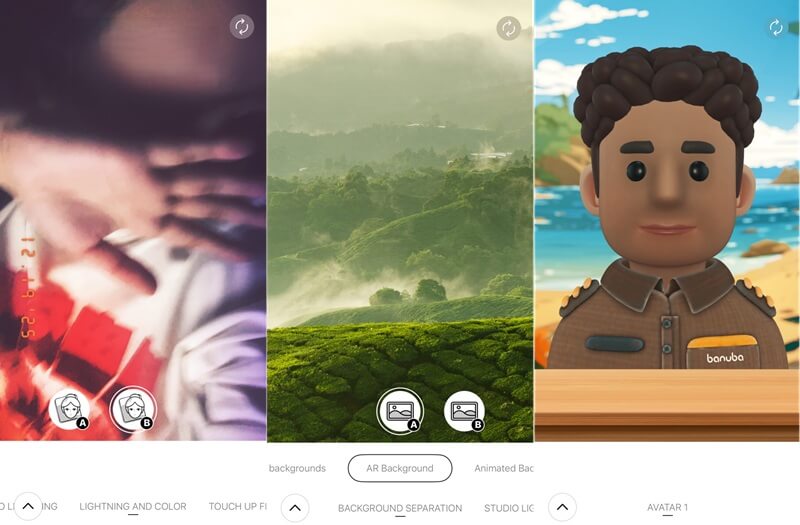
- Banuba's filters and AR effects operate with minimal latency, providing a seamless user experience even during live video interactions.
- The platform also offers a robust set of AI tools for facial analysis, enabling it to detect emotions and accurately track facial features.
- Its advanced tools and SDK are mainly made for developers and businesses, so it can be hard to use for regular users who just want a simple filter app.
7. Sweet Face Camera
Standout Feature: It offers a vast collection of stickers for real-time photo capture, letting you personalize your selfies and videos with a playful, dynamic touch.
Sweet Face Camera emerges as a strong option among apps similar to Snapchat filters. When we tried it, the variety of features stood out right away. First, users can explore over 400 stickers, making photos more playful and expressive. In addition, the cartoon effect and comic selfie tools are great for creating animated and creative images. The app also offers cute beauty filters that enhance selfies without looking too heavy. Unlike Snapchat, Sweet Face Camera includes ready-made templates in styles like minimal, modern, and retro. Moreover, these templates are useful for quickly and easily creating invitations or simple commercial images.
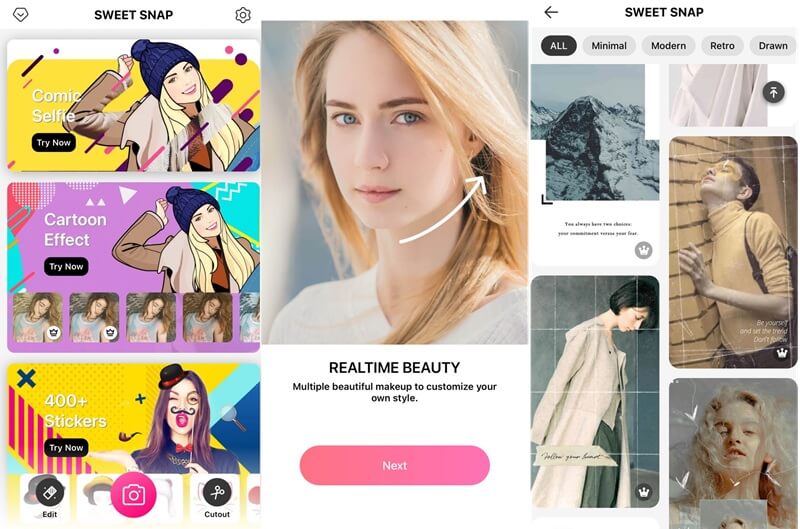
- It also lets you carefully edit photos by smoothing skin, removing spots, and adjusting facial features, which is great for portraits.
- The application also lets you set a timer for photos, ensuring you have enough time to compose your shot perfectly.
- The application focuses more on photos than video effects, and it may contain intrusive advertisements that disrupt the user experience.
8. B612
Standout Feature: It stands out for its sophisticated AI-powered beauty effects that you can apply easily.
B612 stands out as a creative filter app similar to Snapchat, with a stronger focus on beauty and editing. It is developed by SNOW and offers sophisticated, easy-to-use AI-powered beauty effects. Moreover, you can explore multiple AI tools, such as motion photo, AI style, and more. It also provides unique filters such as B&W Horror Comic, Flash Pro, and Japanese Anime. In addition, B612 lets you edit both images and videos, with a scope of advanced tools to refine your multimedia content. You can also retouch photos, reshape your body, and try trending filters effortlessly. Compared to Snapchat filters, B612 offers a more extensive suite of customizable beauty tools.
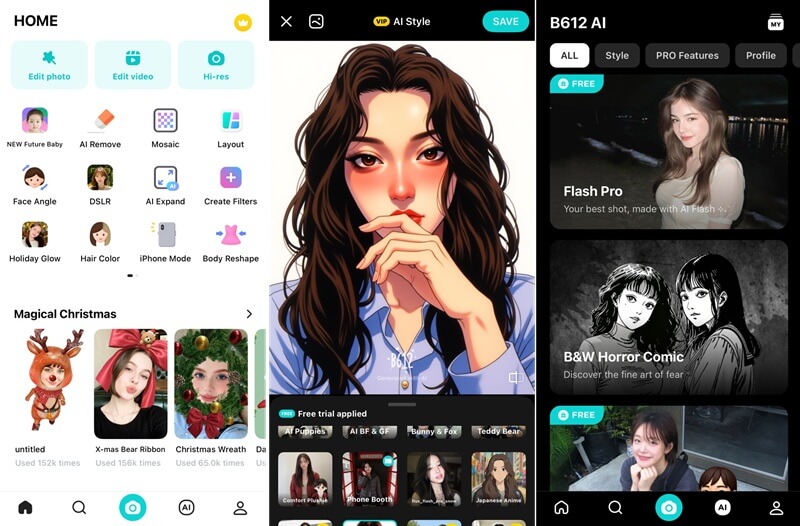
- It also has a feature that lets you search for trending and creative photo and video filters, so you can stay updated with the latest trends.
- The app also includes an AI expand feature that smartly extends image backgrounds, giving users more freedom to adjust their photos and be more creative.
- Although B612 offers powerful editing tools, its many features can feel confusing to users who only want quick, simple filters.
Extra Tips: Generate and Apply Photo Effects Online
If you want to improve your photos without installing any apps, the AI Image Generator & Editor is a simple online tool to try. It lets you upscale image quality, fine-tune details, remove unwanted objects, and make quick edits with ease. This web-based tool is convenient, fast, and ideal for users who want easy photo enhancements anytime. In this section, we will show you how to use photo effects and the text-to-image feature to create eye-catching, creative results.
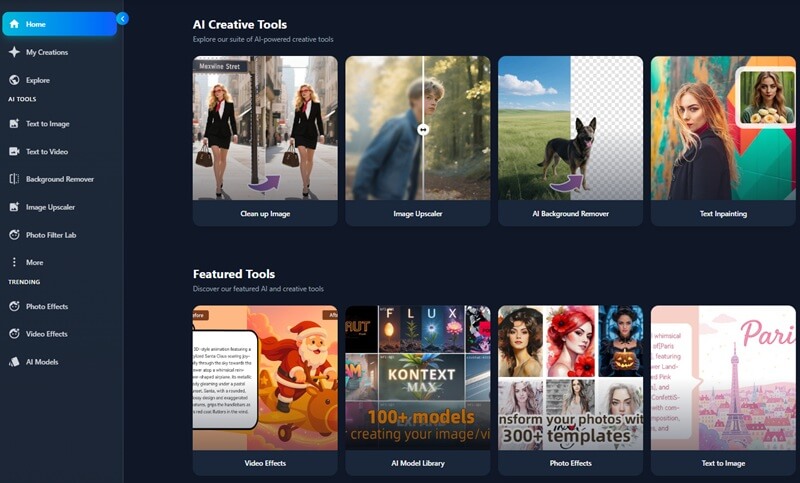
Photo Effects
This feature lets users apply different artistic styles and filters to their images. Like Snapchat filters, it lets you make instant visual changes to photos, making them more engaging. In addition, these photo effects can significantly alter an image's look and mood. For example, if you want to add warm temperature to Instagram Story, you can do it quickly with just a few clicks with free online filters like Snapchat. Here are the steps to apply different style changes, including cartoon effects that turn images into animated looks.
Step 1 Upload Image
Access the online tool and select the "Photo Effects" option from the main dashboard. Then, upload the desired photograph from your device by clicking on the designated upload area or by dragging and dropping the picture directly onto the interface. The image will then be displayed in the tool's interface.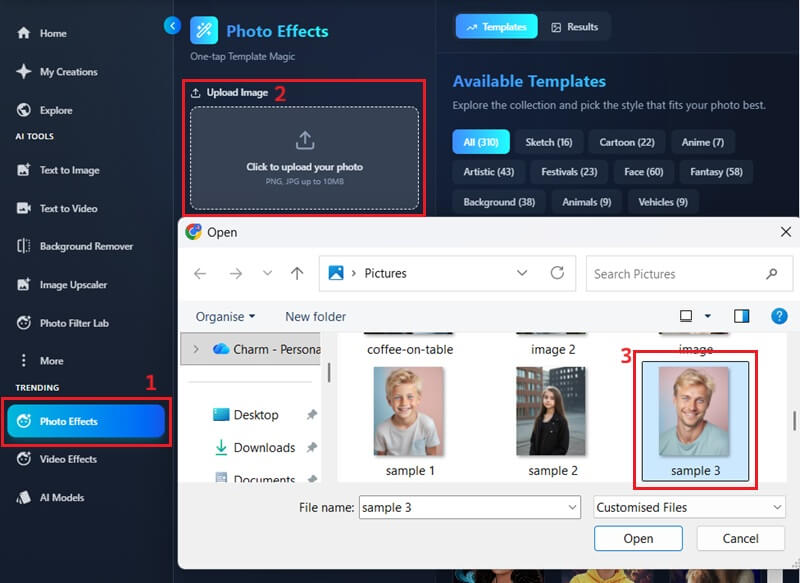
Step 2 Apply Photo Effects
Once the image is loaded, you can browse a diverse spectrum of artistic filters and styles. Once you decide on an effect, simply click to apply it to your image. The AI Image Generator & Editor tool will then process your image and apply the effect you chose.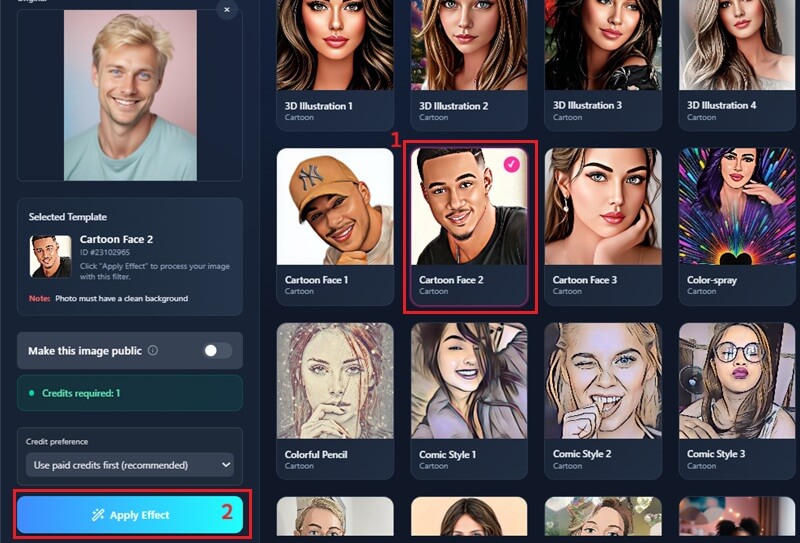
Step 3 Share or Download Image
When the transformations are complete, the image will appear on the preview panel with the newly applied effect. You can download the enhanced picture to your device or directly share it on eclectic social media platforms. Just click the icon for your preferred action, and the tool will handle the rest.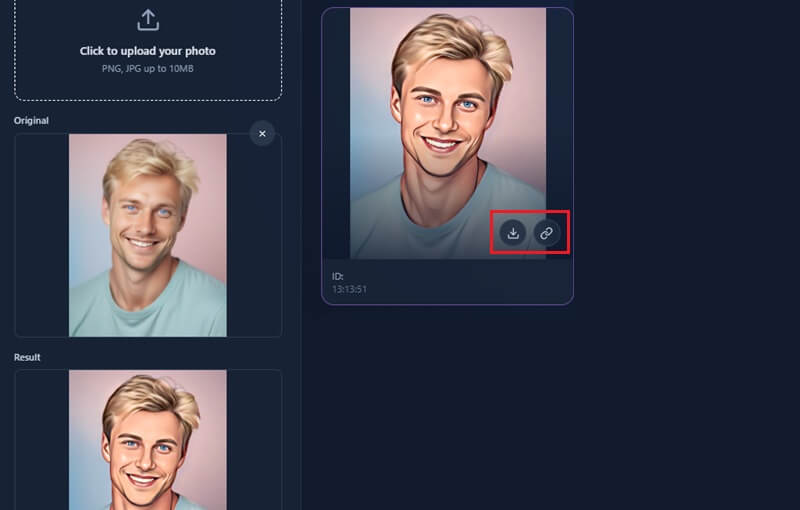
Text to Image
Another useful feature of the AI Image Generator & Editor is its text-to-image tool. This lets users create images from written descriptions, turning words into visuals. The main advantage is that it uses advanced AI models, which yield accurate, impressive results. With these, you can easily bring your ideas to life in image form. Below are the steps to generate images directly from textual prompts.
Step 1 Input Descriptive Prompt
Begin by navigating to the "Text to Image" feature of the online tool. Then click the AI model's drop-down menu. After that, enter the text prompt into the prompt box, making sure to describe the image you want to generate.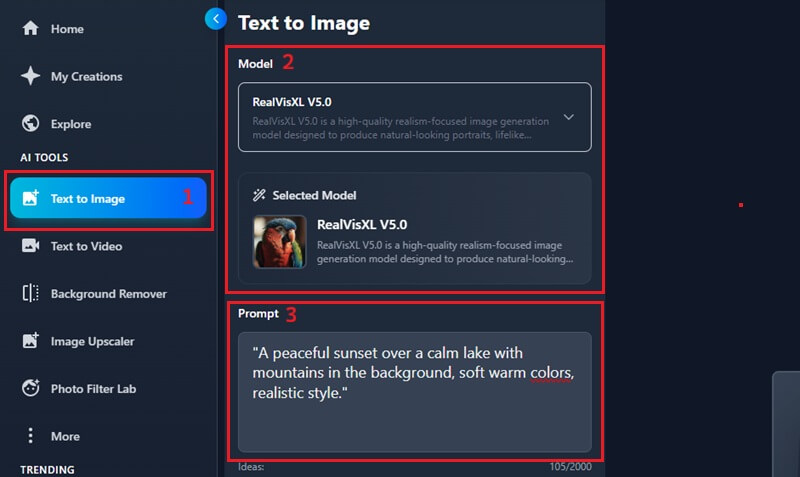
Step 2 Create an Image from a Text Prompt
After entering your prompt, choose the aspect ratio for your image. There are several preset dimensions available to match your needs. Next, hit the "Create" button at the bottom of the tool to generate the image from your text.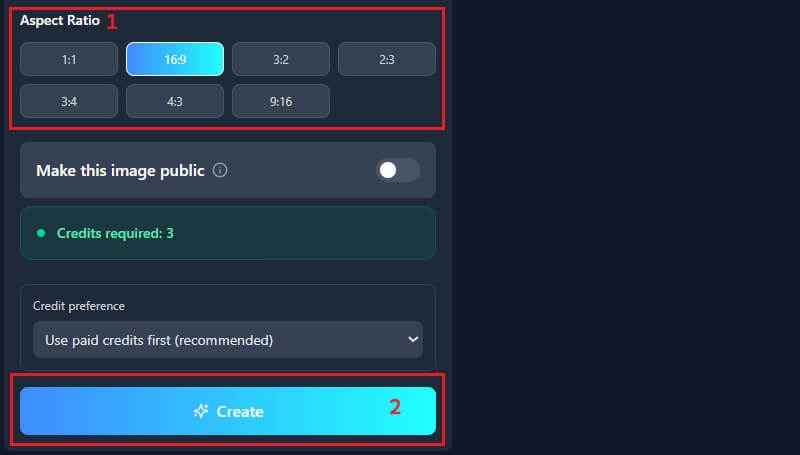
Step 3 Save the Generated Photo
After the photo is generated, you can first preview the results. Then, you can check the details and see how it looks. Finally, download the high-resolution image directly to your device.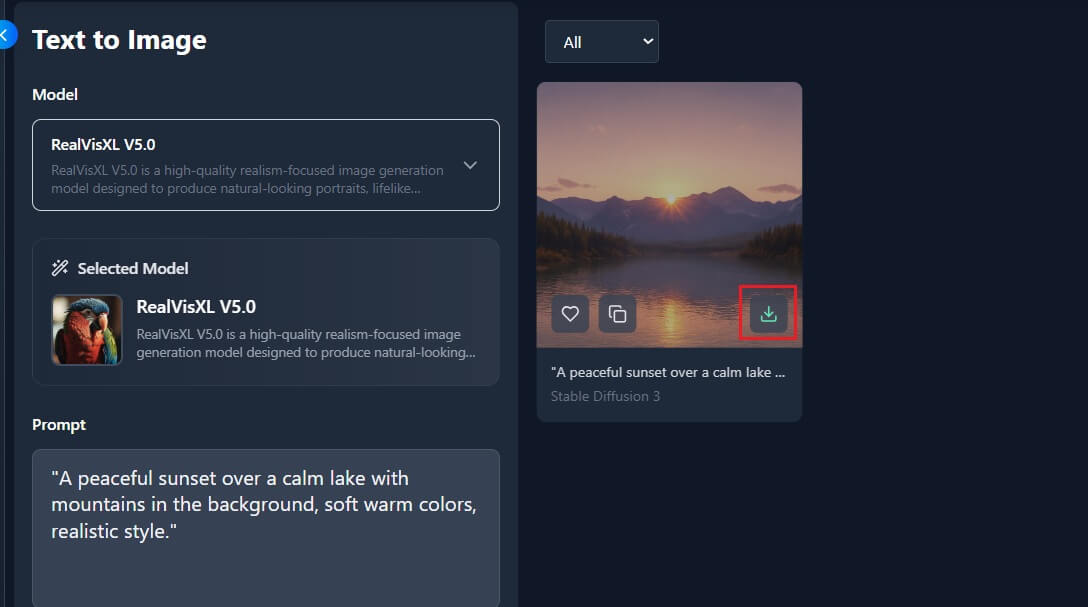
Conclusion
While Snapchat is still a popular choice, many great filter apps now offer a range of styles, tools, and experiences. In addition, from fun stickers and AR effects to beauty edits and creative templates, these alternatives give you more ways to express yourself. Because each app mentioned above has its own strengths, it’s also worth trying a few to see what fits your style best. Ultimately, experimenting with different apps can help you discover new looks, boost creativity, and find the filter app that truly matches your personality.