menu

Create Quality Image Backgrounds Online

instantly replace image background

Instantly Replace Image Background

Our AI background changer lets you instantly replace the image background in just one click. The smart AI automatically detects the main subject in your photo and cleanly separates it from the background. You don't need advanced editing skills; simply upload your image, and the tool does all the work for you.

Moreover, it saves you time by giving fast and accurate results. Whether you want to remove a messy background or add a new one, this tool helps you create professional-looking images in seconds.

Easily Add AI Background to Your Image

You can easily change photo background online without installing any software. The process is simple. All you have to do is upload your image, choose a new background, and download your edited picture. Everything happens in your browser, making it convenient and accessible anytime.

In addition, this auto background changer tool works smoothly on any device, from computers to phones. It's perfect for beginners, photographers, and content creators who want quick and clean edits without effort.

easy to use online image tool
smart and accurate background detection

Smart and Accurate Background Detection

Powered by advanced AI, our AI photo editor background automatically recognizes people, objects, and even hair strands with precision. It keeps the edges sharp and realistic while removing unwanted backgrounds perfectly.

Furthermore, it works well with different types of photos, such as portraits, products, or pets. The intelligent detection ensures your subject always stands out, making it ideal for social media posts, online stores, or professional designs.

How to Replace Image Background Online?

access the background changer
select ai background
edit and download image
  • 01
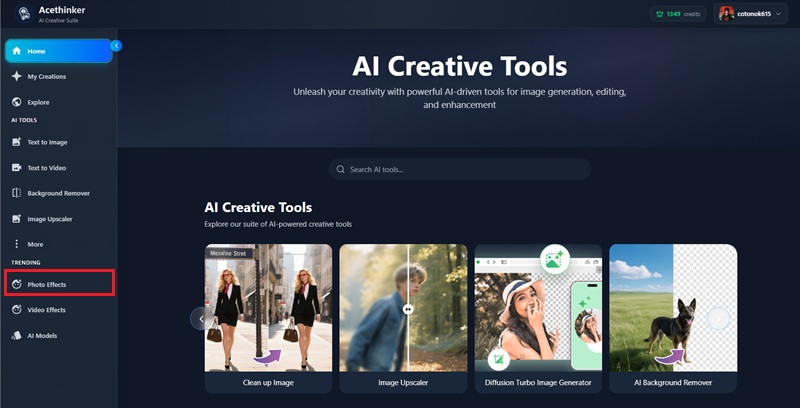
    Access the Background Changer

    First, navigate to the official website of this AI background changer. Then, click the "Photo Effects" option.

  • 02
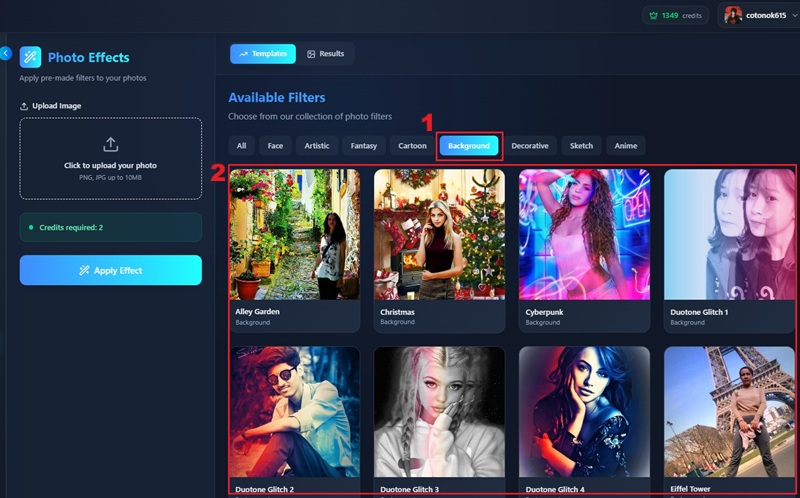
    Select AI Background

    On the "Photo Effects" panel, click the "Background. After that, select the filter or background you want to use.

  • 03
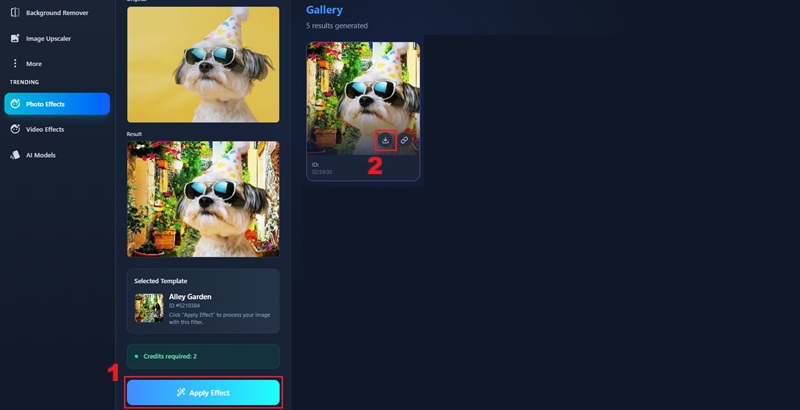
    Edit and Download Image

    Lastly, upload the image by clicking on the upload box. Then click the "Apply Effects" button to apply the background, and then download the photo.

Frequently Asked Questions

What is an AI background changer?

Our AI background changer tool is an online tool that uses artificial intelligence to automatically detect and isolate the subject from the background in a photo. With this background changer tool, you can easily replace or customize backgrounds to create professional-looking images in seconds.

Can I upload JPG images on this platform?

Yes, our AI photo editor background fully supports JPG and PNG image formats. You can easily upload your photos in either format without any quality loss. This makes it simple to change a photo background online and get great results every time. Just make sure that your image does not exceed 10 MB.

What are the backgrounds supported by the tool?

Our online AI background changer offers a diverse array of customizable backgrounds. You can pick from a curated library of colors, patterns, and scenes, ensuring you can find the perfect background for your images.

How can I change my photo's background to black?

You can change your photo's background to black using our online AI background changer. First, remove the background and click the "Edit" button. From there, choose a new background for it or further enhance your images.

Is this online AI background remover safe to use?

Absolutely, our platform prioritizes your privacy, so you do not need to worry. Your images and personal information are secure with an encryption protocol, ensuring that all data transfers and storage are protected from unauthorized access.

product iconAceThinker PicWish

Edit and Enhance Your Images in Clicks

pro image editor
Back to Top
Contact Us
Learning Center